This is part nine of my Google Speed-Search series. In the last lesson, I gave examples of using Google’s site: syntax. In this lesson, we’re going to have some fun with some really useful search features.
Google as a calculator
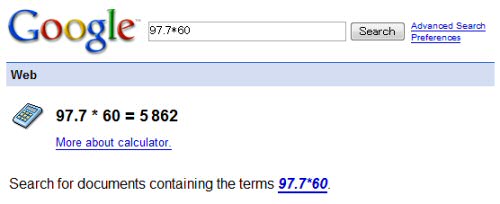
Did you know you can use Google as a calculator? Using either math or plain English, just search with your query, and the Big G will give you the answer!
Examples:
Using Google to convert measurements
Google can also be used for measurement conversion. This is very handy for converting between imperial and metric, and is so much faster than searching for a dedicated website and using that.
Examples:
Google for currency conversion
If you live in Japan, you’re probably converting yen to dollars or pounds and back again quite regularly. You might even use a website like xe.com, but did you know you could do it all in Google?
Examples:
Using Google as a dictionary
When you’ve lived in Japan a long time, you’ll start to forget how to spell English words, and even forget the meaning of some of them! If you are like me, you’ll absolutely love Google’s define: syntax.
Examples:
Google as a know-it-all smarty pants!
Although Google as a search engine typically points you to websites that can answer your questions, it occasionally likes to show off and just tell you the answers without you needing to visit any websites at all! Try these:
- population of Japan
- temperature in Tokyo
- time in Calgary
- currency of Malaysia
- weather in Nagoya
- president of France
This is all just a little of what you can do with Google, and maybe I’ll come back and cover more search features another time. If you’re keen to learn more, you should take a look at Google Help : Search Features.
If you like, you can find me on Twitter at @nick_ramsay. I'd love to hear from you!
It really is an amazing tool when you know how to get the most out of it.
I had a friend complaining how she was busy and then still had to do some research and find out how to grow wheatgrass in order to help her sister with an assignment.
It was that day i realised, upon telling her to put “how to grow wheatgrass” in a google browser, that there’s plenty of people out there that really don’t know how to use the tools to their advantage.
Some great tips there Nick …. but i just can’t let go of xe.com i’m used to seeing the graphical breakdown !
Shhh! I still use xe.com, too! 😉
You’re right, though. No-one is ever taught how to use a search engine properly (at least my generation weren’t), and that’s what inspired me to write this series.
I’ve never known about this before…That’s very useful, especially the converter.
I have to tell you something Nick and that’s I’m actually using your posts to become more efficient at searching Google. Just the other day I wanted to know exactly what (sic) means when you read it in news articles. I kind of guessed what it meant but I wanted a hardcore definition.. So without even thinking about it I typed in to google “define (sic) and it worked! I got my answer!